Scams have a way of sounding like they happen to other people. A statistic on the news. A number in a report. Someone else. But every one of those numbers is a real person: someone balancing work, family and a busy life, or someone who clicked the wrong link on a hectic day.
At More, helping people stay connected is only part of what we do – helping protect what matters most in your world is just as important.
That's why we're continually investing in strengthening our account security, enhancing scam prevention measures and providing safer ways for customers to manage their services.
While technology plays an important role, the reality is most scams still rely on creating a sense of urgency, fear or excitement so people act before they've had a chance to think.
The reassuring part? You don't need to be a cybersecurity expert to help protect what matters most in your world. If you're ever unsure what to do, remember these three simple steps:
Stop. Check. Protect.
Stop
Many scams run on urgency:
• Your account's about to be suspended.
• A parcel is stuck.
• A payment is overdue.
• A once-in-a-lifetime deal ends tonight.
That pressure isn't a coincidence – it's the whole strategy.
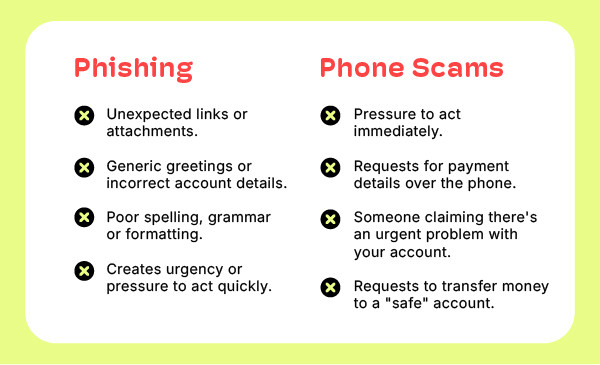
A legitimate business will always give you room to breathe. So, when a message insists you act right now, treat the urgency itself as the warning sign and give yourself permission to pause. Helping keep yourself protected starts with knowing what red flags to look out for:
Check
☑️ Come to us directly
Rather than tapping a link in a text message or email, reach us through your own saved bookmark or by typing our web address into your browser.
Fake look-alike websites remain one of the most common tools scammers use. A trusted bookmark can help you avoid them. It takes less than a minute to save our website and login page today, and it could save you a much bigger headache later.
☑️ Read your codes carefully
Some verification codes are for logging in to your Customer Portal or app, while others may be used to help verify your identity during a support interaction.
That’s why it’s important to read the full message before sharing any code. The message will tell you what the code is for and whether it should be shared with a More team member.
If a message says not to share the code, keep it private. And if someone is pressuring you to provide a code, especially if the request feels rushed or unexpected, pause and contact More directly using the details on our website.
☑️ Be wary of unusual payment requests
Requests involving gift cards, cryptocurrency or a sudden change to payment details are classic red flags. If something seems unusual, take a step back and verify it independently before proceeding.
☑️ When in doubt, go direct
If someone contacts you claiming to be from More and something doesn't feel right, end the conversation and contact us. It's safer to pause and verify.
Protect
A few minutes of setup today can make a lasting difference to the security of your online world:
☑️ Turn on Multi-Factor Authentication (MFA)
We've rolled out MFA and passkey sign-in across our customer portals, making it harder for anyone else to access your account. If you are unsure how to add MFA to your account, click here.
It's equally important to protect your email account, because that's where password resets and verification codes are delivered. Protect your inbox and you're helping protect everything connected to it.
☑️ Use strong, unique passwords for each account
Reusing passwords means a single data breach can potentially unlock multiple accounts.
A reputable password manager can create and securely store strong, unique passwords for you, making life easier and helping keep your accounts protected.
☑️ Keep your devices up to date
Software updates quietly fix security vulnerabilities that scammers often look to exploit. When those update reminders pop up, it's worth taking a minute to install them.
☑️ Take care on public Wi‑Fi
Public Wi‑Fi is great for checking the news or browsing social media. But, for more sensitive activities such as banking or account logins, it's best to wait until you're connected to a trusted network.
What we’re doing behind the scenes
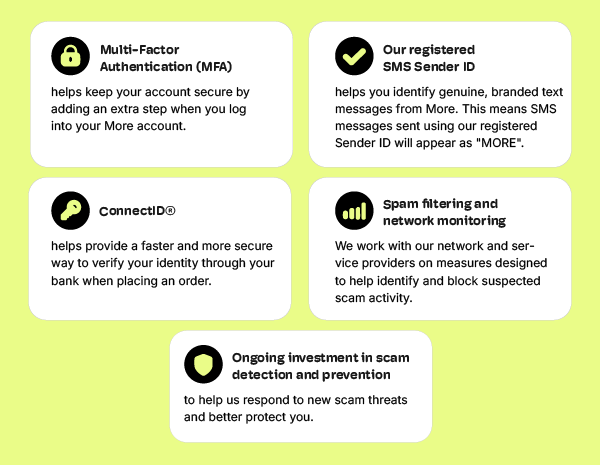
Staying safe online shouldn't fall solely on your shoulders. That's why we're continuing to invest in smarter security measures behind the scenes, as shown below, all of which help create a safer experience for your connected world.
If you think something's slipped through…
If you're concerned that your information may have been exposed, act quickly:
- Change passwords on any affected accounts.
- Contact your bank or financial institution if payment details may be involved.
- Monitor your accounts for unfamiliar activity.
- Report the scam to ScamWatch at www.scamwatch.gov.au.
- Get in touch with us so we can help secure your More account.
Scammers may change their tactics, but their goal stays the same: rushing people into acting before they've had a chance to think. Give yourself that moment and; Stop. Check. Protect.
Because behind every account, every service and every statistic is a real person with a life, a family and a world worth protecting.
And to us, you'll never be just a number.
Want to learn more about protecting your digital world? Visit our Online Safety & Cyber Security page for practical tips.